FAQ

Frequently Asked Questions

Answers to common questions about Xplain Data’s ObjectAnalytics™ and CausalDiscoverer.

Licensing & Setup

General FAQs

  • Supported operating systems: Windows, macOS and Linux
  • Recommended browser: Google Chrome
  • For full details, see the system requirements in our documentation.

  • The CE is for non-commercial use only. It may not be used for commercial purposes, including in a business context or to generate profit.
  • For the full terms, see our Terms & Conditions.

  • A CE license is valid for six months.

  • Go to our Pricing page, choose the plan that fits your needs and follow the instructions there.

ObjectAnalytics

FAQs ObjectAnalytics

In this section, you’ll learn:
  • What ObjectAnalytics™ (OA) is, what it isn’t, and why it’s essential for Causal Discovery
  • Best practices for importing and analyzing data in the ObjectExplorer (XOE)

  • ObjectAnalytics™ (OA) restructures data around a central focus entity, such as the patient, the manufactured part or the customer. Data entities are treated as objects instead of flat tables or data frames. Learn more in this video or in our documentation.

  • Storing data as objects instead of flat tables means that all relevant information about an object is readily available and doesn’t have to be looked up first. This significantly improves runtime and scalability, which is especially important for Causal Discovery.
  • Typical Causal Discovery algorithms struggle with complex real-world data, because millions of possible variables or features can be built from it. Standard algorithms simply cannot handle tables with millions of columns in a reasonable time. ObjectAnalytics (OA) significantly outperforms these benchmark methods.

  • ObjectAnalytics (OA) works best with complex real-world data, for example from a relational database. The more sub-objects are attached to a root object, the more OA can play to its strengths by computing meaningful features across them. Typically, these sub-objects are streams of events (diagnoses, prescriptions, measurements, etc.).
  • Ideally, each sub-object also has timestamps. This ensures that events are considered in the correct (causal) order.

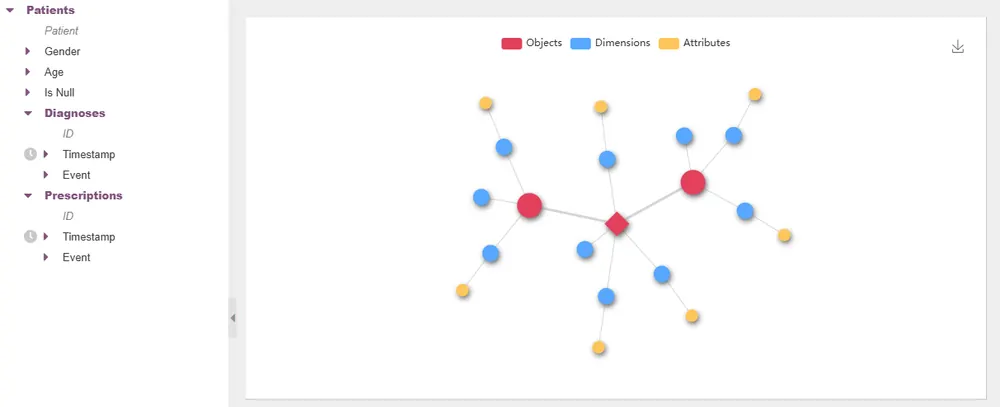
  • Each table in the source database is treated as an object. One of them is defined as the root object, and others are attached to it as sub-objects. For example, “Patient” can serve as the root, with “Diagnoses” and “Prescriptions” attached as sub-objects.
  • Each object is described by its own dimensions (features of the object) and attributes (binnings of a dimension; a dimension can have several attributes, see the ObjectExplorer documentation). Together, these objects, dimensions and attributes form the ObjectTree.
ObjectTree in the Xplain ObjectExplorer showing a root object with its sub-objects, dimensions and attributes

  • You could, but only by transforming the data first, and that is exactly where bias creeps in during data preparation and feature selection.
  • There is no unique way to flatten multiple tables into one. Each object fits easily into its own table, but how do you attach the sub-objects to the root object? You would need a column for every single diagnosis and its timestamp, and the same for every prescription:
    1.Diagnosis type1.Diagnosis date2.Diagnosis type2.Diagnosis date...100.Diagnosis type100.Diagnosis date
    Since every patient has a different number of diagnoses and prescriptions, the table must be as wide as the patient with the most entries. The result: a huge number of columns, most of them empty for most patients.
  • Another way to do it would be to already compute aggregations/features from the data, for example, the number of diagnoses, the sum of total prescription costs etc. But how can we be sure to choose the “right” features beforehand?
  • In other words, while the object-centric view allows a whole 360° view of the object in focus, a flat table representation of the same data will always be like a 2-dimensional projection of a 3-dimensional object. Flattening data introduces bias!

  • In the Xplain Data AdminTool (XAT), by creating an ObjectView.
  • For step-by-step guidance, open the ObjectViewBuilder in the XAT and select Help from the options menu (⋮) in the top right. There you’ll find intro videos, tips & tricks and the full documentation.

  • Very little preparation is needed. As long as the data is consistent (e.g. no mixed data types within a column), the only requirement is a unique ID that links each object to its parent(s). If such an ID doesn't exist yet, you can usually create it by combining one or more existing columns.
  • That's it: the data can be loaded into the ObjectExplorer as a whole, and missing values are no problem.

  • You only need to define the hierarchy of your data: Which object is the main focus (the root), and in which order should the sub-objects be attached? A domain expert usually has a good intuition for a meaningful structure.

  • Not directly in the ObjectExplorer. The ObjectTree is defined in the XAT via an ObjectView. To change it, you can either create a new ObjectView or simply edit the existing one in the XAT by redefining its keys.

CausalDiscoverer

FAQs CausalDiscoverer

  • Most Causal Discovery algorithms scale poorly with the number of variables, which makes them impractical for real-world data. The CausalDiscoverer (XCD) is built on ObjectAnalytics™: all relevant information for an object is readily available instead of having to be looked up in a relational database. As a result, XCD scales far better with large amounts of data.
  • Most of these algorithms also ignore time, so they often struggle to find the correct causal direction. XCD uses timestamps, which makes this simple: the cause always happens before the effect.

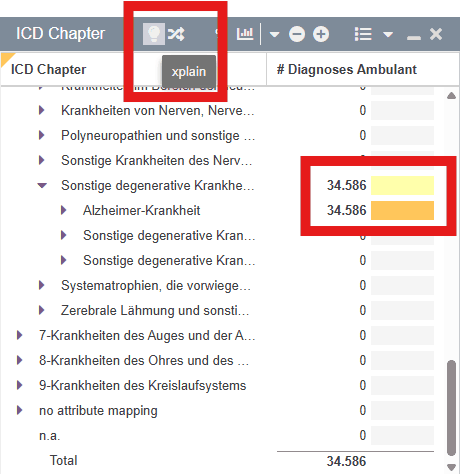
  • Define a target by making a selection in the ObjectExplorer (XOE). Click the lightbulb to load an xmodelconfig file that fits the target.
    XOE window with a selection made and the lightbulb (xplain) icon highlighted
  • This model configuration (model config) has to be created beforehand (see below). It defines the search space and is a JSON file with a specific structure.

  • Ideally, your data consists of several sub-objects, each with timestamps. The CausalDiscoverer (XCD) uses these timestamps to consider only factors that happened before the target. In general, the more variables and relationships your data contains, the bigger XCD’s advantage over standard Causal Discovery algorithms.

  • Then human input is needed to decide which variables to use. From domain knowledge, it is often clear whether an event happens before or after the target. Events that happen after the target must never be used to explain it!

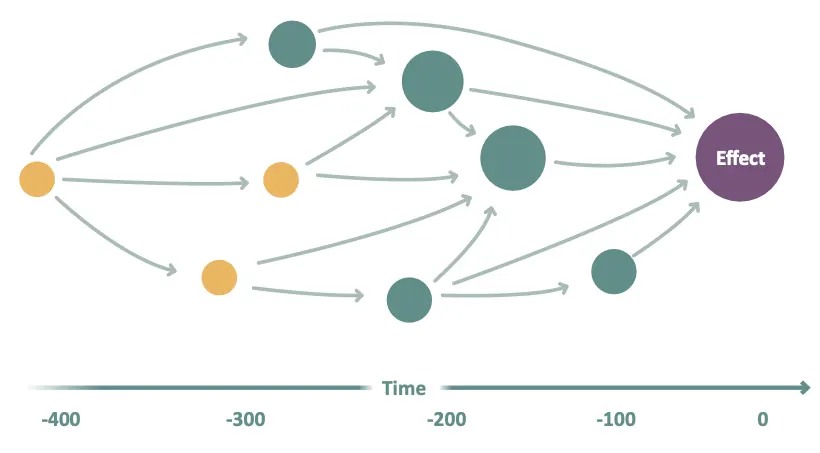
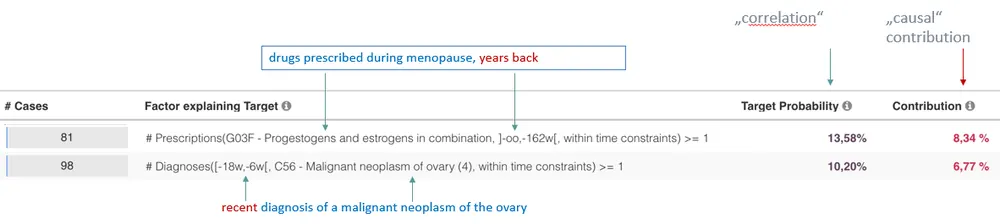
  • In its simplest form, the CausalDiscoverer (XCD) returns a list of direct factors for the target. If you also need indirect (higher-level) factors, XCD can compute a Causal Pathway Graph. It shows both direct and indirect effects and, unlike a standard DAG (directed acyclic graph), also the temporal relations between the variables.
Causal Pathway Graph: factors arranged on a time axis from -400 to 0, with arrows leading through intermediate factors to the Effect

  • The CausalDiscoverer (XCD) always focuses on a specific target event. It does not try to compute a complete DAG from the data: the search space often contains millions of variables (think of an electronic health record), and a DAG with millions of nodes and edges is not human-readable.
  • Instead, XCD computes the direct and indirect causal effects of all relevant factors on the target, plus the dependencies between them. In practice, that is usually all you need.

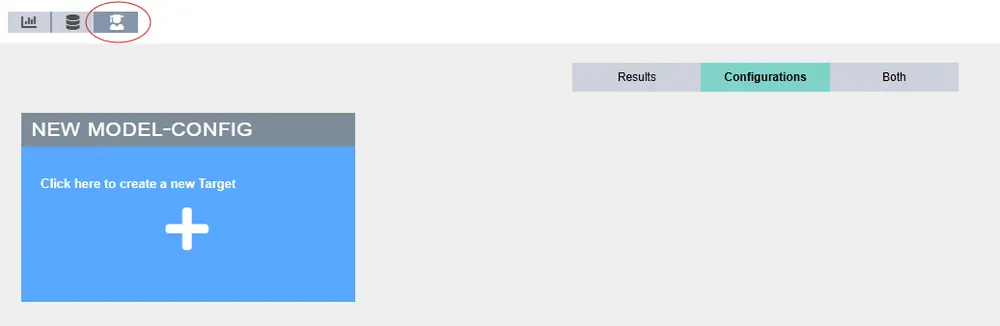
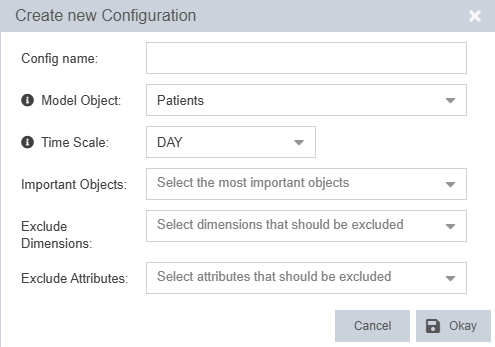
  • No. Model configs can be created automatically in the Causal Discovery View of the ObjectExplorer (XOE).
The Causal Discovery View in the XOE

It only requires minimal input:

Auto model config dialog with fields for model object, time scale, important objects and excluded dimensions / attributes
Model object

Select the model object, which is usually the root. The model iterates over all instances of this object, and features are built by aggregating information from other objects onto it. Not sure which one to choose? Phrase your target as a question: “Why are there model objects with target events?”

Time scale

The time scale defines the time intervals in which events are considered, and thus how close to and how far from the target events are taken into account. Often this is “Day”; in production, it may be “Seconds” or even “Milliseconds”.

Important objects

In the simplest case, use all available objects. With domain knowledge, you may know that some objects aren’t needed, or that a smaller model is enough to start with.

Exclude dimensions / attributes

Exclude individual dimensions or attributes of the selected objects from the model. This is useful, for example, if trivial explanations would hide more interesting factors, or if events without a timestamp are known to happen after the target. Such dimensions or attributes must not be used for model building!
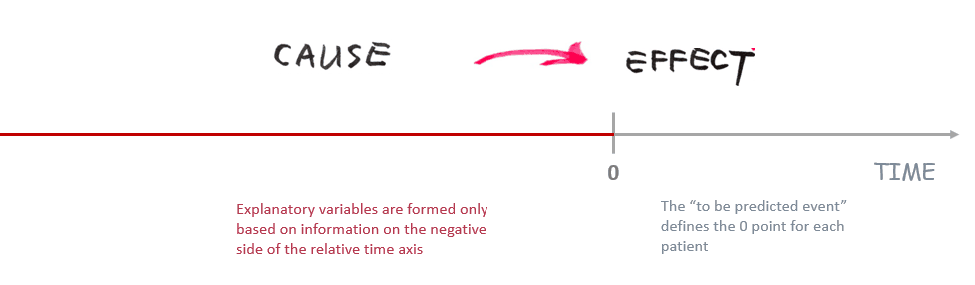
  • The CausalDiscoverer (XCD) places the target event on a relative time axis. For each object instance, it then builds millions of variables from the events that happened before the target and searches them for a handful of causal factors. With a conventional approach, this would mean running a DAG-learning algorithm (DAG = directed acyclic graph) on a table with millions of columns, which is not feasible.
The target event placed on a relative time axis, with the events before it

  • The auto model config – the model config that is generated automatically – defines the search space: the features built from the variables in your data, which are then tested as possible causal factors for the target. In particular, it sets the time buckets the events can fall into and the aggregation functions used to aggregate the data.

  • Say you have selected a target event T and want to explain it with another dimension D. In the ObjectExplorer (XOE), dimensions are represented by their attributes, i.e. discrete intervals of values that D can take. If the attribute has n intervals, D is split into n Boolean variables, one per interval. This means attributes must be well constructed so that they carry enough information. It often makes sense to use several attributes per dimension: one with a few intervals and one with a more detailed breakdown.
  • If the analysis uses a time axis, these n variables are split further. Based on the chosen time scale, time buckets are built relative to the target, and each variable is checked for whether it falls into a given bucket. The result: variables of the form “Dimension D has taken on values [a1,a2] in the time frame [t1,t2] before the target happened.”
    Time buckets built relative to the target event
  • Finally, these variables are transformed using aggregation functions. The simplest is COUNT, but MAX, MIN, AVG and others are also available. One variable might, for example, count how often D took on certain values in a given time frame; another might average those occurrences.

  • Not necessarily, so treat them with care! Depending on your data, the model config may need manual editing. A common reason: the result contains factors that explain the target almost perfectly. This is usually a trivial relation that domain experts already know, but because its model fit is so good, it hides other, more interesting factors. Use Exclude Dimensions / Exclude Attributes to refine your model.
  • The auto model config sets up the search space as well as it can automatically. To fine-tune details such as the time buckets or the aggregation functions, edit the xmodel JSON file in the model center.

  • Start with a simple auto model config as described above. If the results aren’t satisfactory yet, you usually need to add or remove dimensions, so simply create another auto model config. If the results are still not satisfactory after a few iterations, edit the model config file manually as described in the documentation.

  • Check your attributes. Dimensions are represented by their attributes, and if an attribute has too many or too few intervals, the results may not be significant. Defining another attribute for that dimension often improves the results.

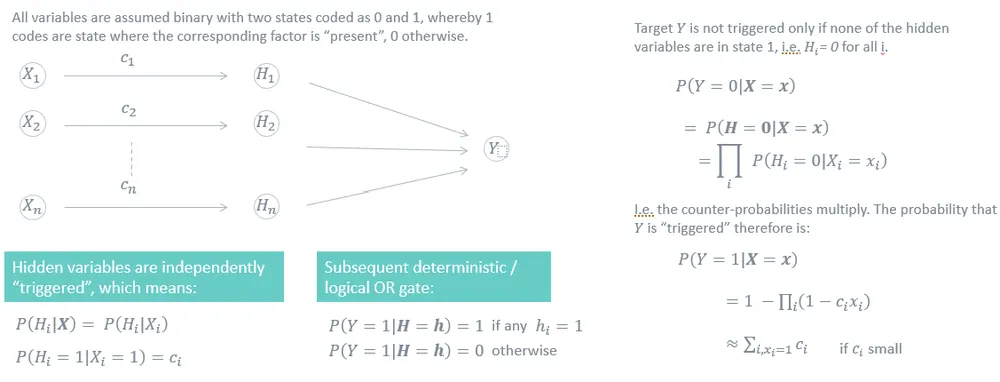
  • The CausalDiscoverer (XCD) is based on the Noisy-OR gate, an Independence of Causal Influence (ICI) model.
Noisy-OR gate / ICI model: binary variables X1…Xn trigger hidden variables H1…Hn independently with probabilities c1…cn, followed by a deterministic logical OR gate producing target Y; P(Y=1|X=x) = 1 − ∏(1 − c_i x_i), approximately the sum of c_i if c_i is small
No matching questionsTry a different term, or .

Get the Big Picture.Uncover the Why.Start Improving Today.

Link copied